
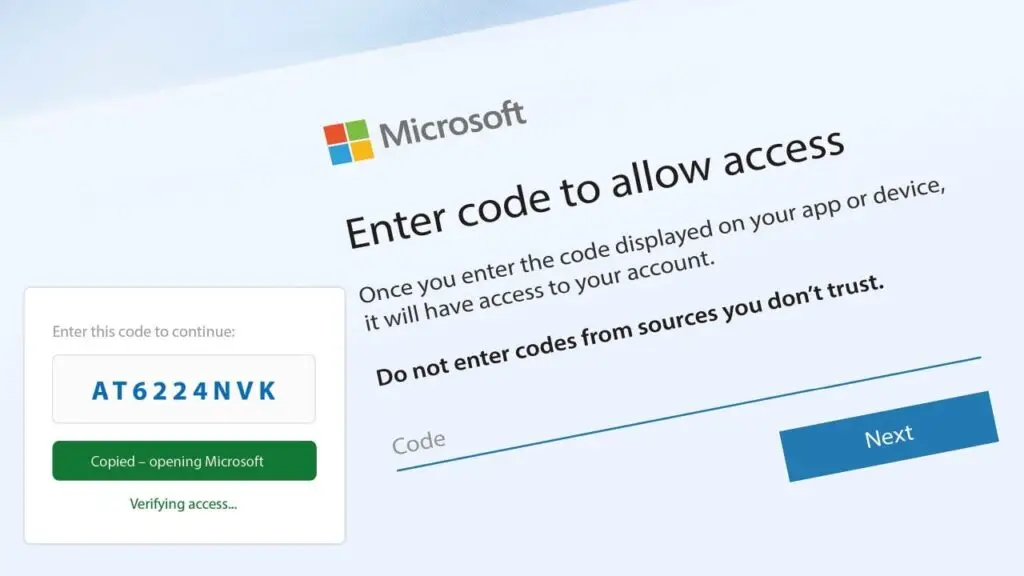
One employee receives an email that looks like a routine request to review a document, open an invoice, check a proposal, or confirm a password change. The link eventually opens a real Microsoft sign-in page. The employee enters a short code, completes the familiar login process, and moves on with the day.
Unfortunately, that simple action may have just given a criminal access to the employee’s Microsoft 365 account.
This technique is called device code phishing, and a cybercrime platform known as EvilTokens has helped attackers use it on a large scale. According to Microsoft Threat Intelligence, campaigns connected to EvilTokens compromised more than 12,000 inboxes across over 10,000 organizations worldwide.
The affected industries included construction, financial services, real estate, healthcare, education, and wholesale distribution. The lesson is simple: device code phishing is not limited to one type or size of organization.
What Is Device Code Phishing?
A device code is a legitimate Microsoft sign-in method. It is commonly used for devices that may not have a normal keyboard or browser, such as smart TVs, printers, Microsoft Teams equipment, and conference room systems.
Normally, the device displays a short code. The user visits Microsoft’s device login page on another device, enters the code, and approves the sign-in.
In a device code phishing attack, the criminal starts that process instead. The victim receives a fraudulent email containing a link or attachment. The message may refer to an invoice, shared file, request for proposal, voicemail, password expiration notice, or another believable business task.
After clicking, the victim is shown a code and directed to Microsoft’s real website. When the victim enters the code and approves the request, Microsoft authenticates the session that the criminal started. The attacker may receive access without ever learning the victim’s password.
That legitimate Microsoft page is part of what makes the attack convincing. Employees are often taught to inspect website addresses, but seeing a real Microsoft address does not automatically mean the request itself is safe.
How EvilTokens Makes the Threat More Dangerous
EvilTokens is a phishing service designed to make these attacks easier to launch and manage. Microsoft reports that the phishing service offers ready-made phishing templates and dozens of themes that criminals can customize for different organizations and job roles.
The platform also uses artificial intelligence to speed up what happens after an account is compromised. Instead of manually reading thousands of emails, an attacker can use AI to identify:
- Executives and managers
- Employees who can approve payments
- Vendors and trusted business partners
- Pending invoices and wire transfers
- Sensitive conversations and valuable data
- Opportunities to impersonate someone the victim already knows
For a healthcare practice, that could put patient or billing information at risk. A law firm may have confidential client communications or financial instructions in its inboxes. A manufacturer may exchange proposals, payment details, and supply chain information by email. A nonprofit may store donor records and discuss fund transfers. Every industry has information and trusted relationships that criminals can exploit.
Attackers may also create hidden inbox rules, forward messages, register another device, or send convincing emails from the compromised account. Because those messages come from a real employee’s address, coworkers, customers, and vendors may be more likely to trust them.
Does Device Code Phishing Defeat MFA?
Multi-factor authentication, or MFA, is still one of the most important protections a business can use. Device code phishing does not make MFA pointless.
The problem is that this attack can trick a user into completing the authentication process for the criminal. The employee is not simply losing a password. The employee is unknowingly approving access.
This is why cybersecurity cannot depend on one tool. Strong protection combines MFA with secure Microsoft 365 settings, access policies, email filtering, account monitoring, and employee education.
How Businesses Can Reduce the Risk
Microsoft recommends blocking device code sign-ins when an organization does not need them. If certain conference room or Teams devices require the feature, access can be limited to those specific accounts through Microsoft Entra Conditional Access policies.
Businesses should also take the following steps:
- Teach employees when device codes are appropriate. Staff should never enter a device code unless they personally started a sign-in on a known company device.
- Use stronger sign-in protections. Properly configured MFA, Conditional Access, passkeys, and security keys can reduce account compromise risk.
- Strengthen email security. Anti-phishing policies and Microsoft Defender Safe Links can help identify suspicious messages and links.
- Monitor account activity. Unexpected device registrations, risky sign-ins, new forwarding rules, and unusual mailbox activity should be investigated quickly.
- Verify financial requests separately. Changes to payment instructions, bank accounts, or wire transfers should be confirmed through a trusted phone number or another established communication method.
- Have a response plan. If an employee enters an unexpected code, contact your IT provider immediately. A password reset alone may not remove the attacker. Active sessions and authentication tokens may also need to be revoked, and the mailbox should be checked for hidden rules or unauthorized activity.
Microsoft 365 Security Requires the Right Configuration
The EvilTokens campaign is a reminder that familiar tools can be abused when identity and access settings are not properly managed. Microsoft 365 offers strong security capabilities, but those protections must be configured, monitored, and adjusted to fit the way each business operates.
TotalBC helps businesses across North and South Carolina strengthen their cybersecurity and properly manage their Microsoft 365 environments. Our goal is to make security understandable and practical, whether you operate a healthcare office, law firm, manufacturing facility, nonprofit, or another growing organization.
If you are unsure whether device code sign-ins are enabled, whether your Microsoft 365 security policies are properly configured, or how quickly your team would recognize a suspicious login request, now is a good time to review your setup. Contact TotalBC to schedule a Microsoft 365 or cybersecurity assessment before one misleading sign-in becomes a much larger business problem.