
You can spend hours improving your website, running ads, and bringing new customers to your business. But what happens when those customers pick up the phone?
If nobody answers, the call goes to the wrong department, or a callback gets forgotten, your marketing investment can end with a dial tone.
For business owners, those gaps can be difficult to see during a busy workday. CallNet call analytics help make them visible.
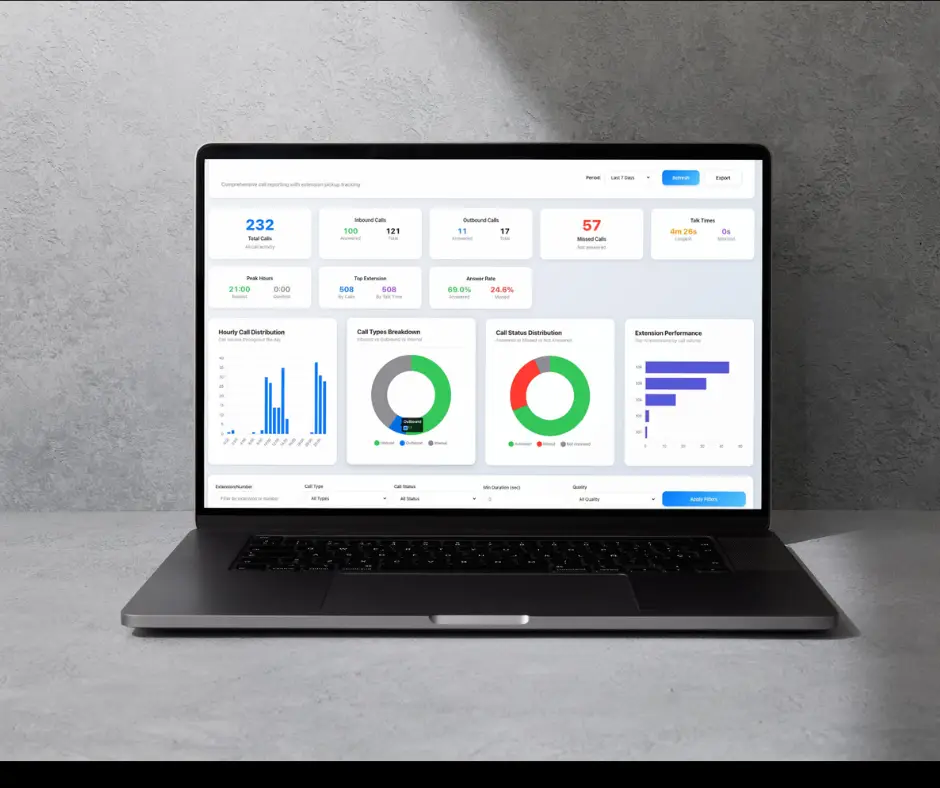
With CallNet VoIP for Business from TotalBC, you can use call activity to spot missed opportunities, make better staffing decisions, and improve customer service. Here is how that information becomes useful to your business.
What Are Call Analytics?
Call analytics turn information from your business phone system into reports you can use to understand how your team handles calls.
CallNet includes call analytics and reporting to track call volume, missed calls, and performance trends. Call logs also show answered calls and who handled them.
You do not need to be a technology expert to understand the value. These reports help answer practical questions:
- Are customers reaching us?
- When does our team need more help answering calls?
- Are we following up on missed inquiries?
- Are changes to our phone coverage working?
The benefit is being able to investigate problems you might otherwise overlook.
1. Find Missed Calls Before They Become Lost Business
A missed call does not always mean a lost sale. But when someone is ready to schedule an appointment, request a quote, or hire a service provider, reaching your business matters.
CallNet call analytics help you see when calls go unanswered so you can review coverage and establish a follow-up process.
For example, a contractor might discover that calls are regularly missed while the office manager handles morning paperwork. Moving that task or assigning backup coverage could give more potential customers a chance to speak with someone.
CallNet also offers call forwarding, ring groups, and voicemail to email. Pairing those tools with call analytics gives your team practical ways to respond to the patterns you find.
2. Schedule Staff Around Actual Customer Demand
“The phones were crazy today” tells you something. A consistent pattern of heavy call volume tells you much more.
Reviewing call activity over time helps you understand when customers need your team most. You might find a Monday morning rush, a lunchtime coverage gap, or a recurring increase during your busiest season.
CallNet call analytics give you evidence to guide scheduling conversations. Before adding another position, you may discover that shifting breaks or arranging backup coverage addresses the problem.
That can help you use payroll more effectively while giving employees a more manageable workload.
3. Make It Easier for Customers to Reach the Right Person
Think about calling a business, explaining your question, and getting transferred to someone who cannot help. It is frustrating, especially when you are already short on time.
Call analytics give you a starting point for reviewing the caller experience. If a department repeatedly misses calls, investigate whether the issue involves staffing, routing, or unclear responsibilities.
CallNet supports routing by department and time of day, along with menus that direct callers to the appropriate team. Explore CallNet’s business VoIP features to see the available options.
Use reporting alongside customer feedback to decide what needs attention. Then review call activity after making changes.
4. Support Employees With Better Information
Call analytics can also help you understand the pressure your employees face.
If one person answers a large share of incoming calls, that responsibility may interrupt other work. If another employee handles fewer calls, their assignments or availability may explain the difference.
Use the numbers to start a conversation. Ask what is working, where callers need extra help, and whether responsibilities are clear.
Call counts alone cannot tell you how helpful an employee was. Combined with context, however, CallNet call analytics can help you distribute work more fairly and identify useful training opportunities.
5. Connect Phone Activity With Business Results
Business owners already review revenue, expenses, and sales activity. Your phone reports deserve a place in that conversation.
Compare call trends with appointment bookings, quote requests, campaign dates, and completed sales. If calls increase during a promotion, check whether your team has the capacity to answer and follow up.
If inquiries rise but bookings remain flat, review what happens between the first call and the final decision.
Call analytics help you ask better questions. Connecting those reports with your sales records helps you evaluate whether more phone activity is translating into meaningful business opportunities.
6. See Whether Your Changes Are Helping
Improvement takes more than changing a setting and hoping for the best.
Start with a clear goal, such as reducing unanswered calls during lunch. Review your current call activity, adjust coverage, and compare results over a similar period.
Consider seasonal demand and changes in total call volume when reviewing the numbers. Ten missed calls out of fifty incoming calls tells a different story than ten out of five hundred.
Making call analytics part of a regular review helps you keep improving as your business grows.
Put CallNet Call Analytics to Work With TotalBC
You should not have to figure out your business phone system alone.
TotalBC builds, hosts, and supports CallNet, and our team helps configure call flows around how your business operates. We can discuss your priorities, explain available features, and help your employees use the system.
Whether you want better call coverage or clearer insight into customer communication, CallNet gives you a practical place to start.
Ready to see what your phone activity could reveal? Contact TotalBC to schedule a FREE CallNet demo and explore a business phone system built around your team.